


Want to know more?
Tell us your situation and a consultant will contact you in no time.
Contact us at

Kuorum allows you to create voting forms in a few seconds and in an intuitive way. Add single choice, multiple choice, closed or open lists, ranking and point distribution questions. You can also divide the forms into sections and customize the configuration of certain questions.
The advanced options of question editing allow you to add longer texts, very useful when voting on regulatory amendments of clubs and sports federations and professional associations.
Kuorum is the most versatile tool on the market and allows you to create single choice, multiple choice, image, point distribution, vote weighting, proxy voting with and without voting instructions, free text, choice of date and conditional. Whatever collective decision you want to make, there is a question type for you.
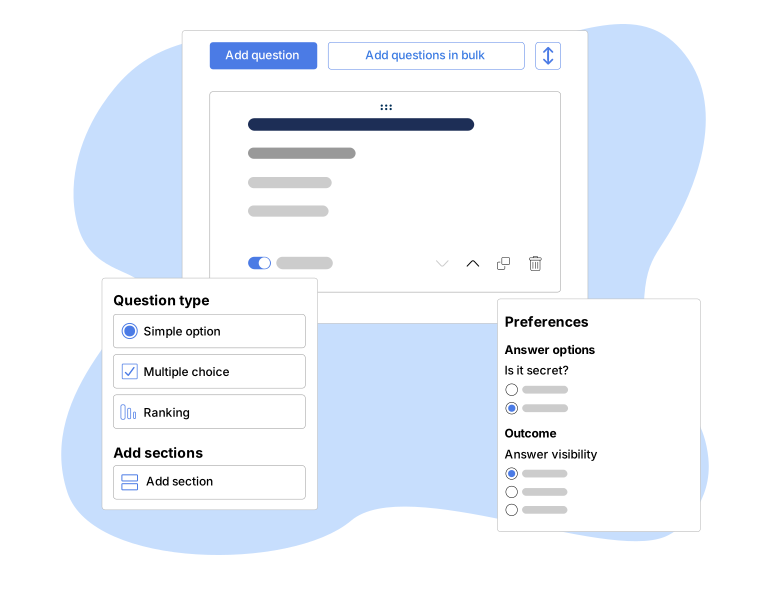
The question type defines how a voter can respond in an online vote: by selecting a single option, multiple options, ranking priorities, or distributing points among candidates.
Kuorum offers more than a dozen configurable question types, allowing the voting form to be adapted to any type of collective decision: from a simple yes/no choice to voting on regulatory amendments with lengthy text in professional associations or sports federations.
Kuorum allows you to tailor the questions for each vote to the purpose of the process and the type of response needed:
- Single-choice: The voter selects a single answer from several options(for example, “yes/no/abstain” or selecting a single candidate).
- Multiple-choice: The voter can select multiple answers within a single question (for example, selecting multiple members for a board of directors).
- Ranking/prioritization: the voter ranks the options from highest to lowest preference, rather than choosing just one; useful in election processes with more than two candidates where voters wish to reflect their full range of preferences.
- Point allocation: the voter distributes a fixed number of points among several options according to their preference (for example, allocating 100 points among 5 projects to be funded).
- Open lists: allow voters to select one or more options from a list of candidates or proposals, without necessarily being limited to a single choice; useful in electoral processes where multiple representatives can be elected.
- Drop-down list (closed): selection of one option from a predefined list; useful when there are many options and you want to save screen space.
- Questions with images: answer options can be accompanied by an image; useful for voting on designs, logos, or candidates with photos.
Kuorum offers various options for structuring and configuring the questions for each vote, providing a clear experience for both those who design the process and those who participate. These features allow the voting process to be adapted to different levels of complexity and user needs:
- Grouping by sections: Questions can be grouped into thematic blocks within a single form, making it easier to navigate votes with many questions.
- Long text in questions: an option designed for voting on regulatory amendments or articles of bylaws, which is common in professional associations, sports clubs, and federations, where the content to be voted on is extensive.
-Customization per question: Each question can be configured independently (required status, response type, conditional settings) without affecting the rest of the poll.
- Quick creation: The editor is designed to create and edit poll questions in just a few minutes, with no technical learning curve.

Integrate with leading video conferencing tools to offer your remote constituents a seamless experience. Compatible with all platforms, such as Zoom, Teams, Webex and many more.


At Kuorum we help people around the world make collective decisions that matter. Tell us your goals and we'll tell you how we can help.


Kuorum allows you to create single-choice, multiple-choice, open-ended list, closed-ended list, image-based, ranking, and point-allocation questions.
In a single-choice question, the voter can select only one answer; in a multiple-choice question, the voter can select several answers within the same question. One or the other is chosen depending on whether the decision allows for a single valid option or several simultaneous options.
This is a type of question in which the voter ranks the available options from highest to lowest preference, rather than choosing just one. It is commonly used in elections with multiple candidates where it is important to know the complete order of preferences, not just the winner.
Voters receive a fixed number of points that they must distribute among the various options according to their preferences—for example, by allocating 100 points among several projects. The more points they assign to an option, the greater the weight that option will have in the final result.
Yes. The advanced question editing options allow you to include lengthy text, a feature used especially when voting on bylaw amendments in professional associations, sports clubs, and sports federations.
Yes. A single form can include different types of questions ( for example, multiple-choice questions for some decisions and a point-based system for others), organized into thematic sections to make navigation easier.
The difference lies in how much freedom voters have to customize their vote within a slate of candidates.
In a closed-list election, slates of candidates are presented as blocks with a fixed order, and voters choose an entire slate. They cannot change the order of the candidates or add or remove names: they vote for the slate as it is presented. This is common when voters want to choose between complete slates or teams, such as when electing a new board of directors.
In an open-list election, voters can influence the composition of the final result. Depending on how the system is configured, they can select specific candidates from one or more lists, rank their preferences, or combine names from different slates. This way, the vote reflects individual support for each person rather than just for a single block.

Tell us your situation without obligation and a consultant will contact you.

Schedule a 30-minute product demo with our experts
