


Want to know more?
Tell us your situation and a consultant will contact you in no time.
Contact us at

Kuorum allows you to manage dynamic voting rights. Kuorum's voting permissions functionality is very useful to unify the census of attendees with and without voting rights in the same file. In this way it is possible to control access to the event and at the same time calculate the quorum without having to worry about the nature of the attendees; AGM members, journalists or technical team.
For example, in shareholder meetings voting, those shareholders who are not present in the physical or virtual room of the event before the appointed time will automatically lose their voting rights.
Another useful application of the voting permissions functionality is the limitation to those voters who are not up to date with the payment of fees. For example, in neighborhood councils.
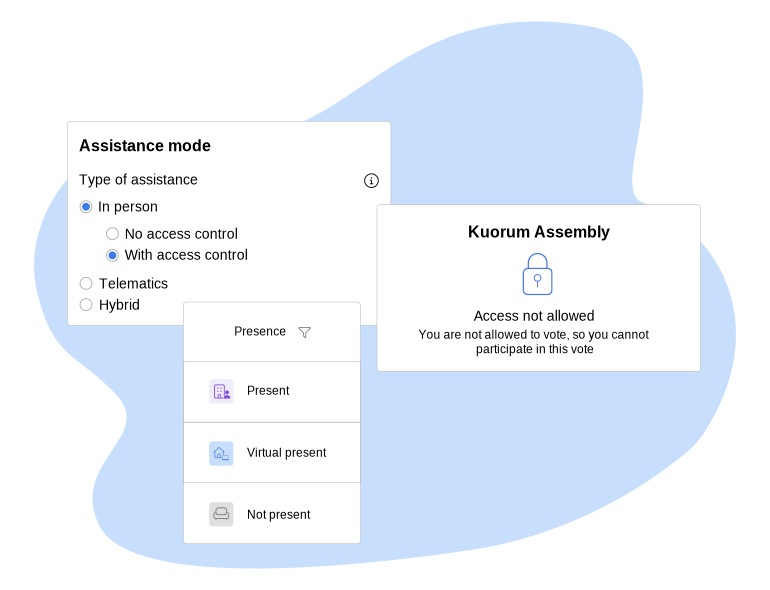
Kuorum lets you manage dynamic voting rights: you decide who can vote, who can only attend, and when those conditions change. Everything is managed through a single voter registry, eliminating the need to maintain separate lists or manually verify who is eligible to vote before each vote.
Voting rights—or voting permissions—define, for each person on the voter list, whether they can cast a vote or merely participate in the event. This distinction is common in any organization: not everyone attending a meeting has the right to make decisions.
With Kuorum, these permissions are part of the voter list itself and are applied automatically during voting. The organization does not have to manually manage exceptions or worry about someone without voting rights accessing a vote.
Our feature consolidates all attendees of the event—whether or not they have voting rights—into a single file. This allows you to control access and calculate the quorum without worrying about the status of each attendee: assembly members, members, guests, journalists, or technical staff.
This simplifies event preparation: you upload a single attendee list, specify who is eligible to vote, and the rest of the process (access control, identification, and tallying of eligible voters) is handled automatically based on that list. You can import it directly from Google Sheets.
Voting rights may be subject to conditions that change during the event. For example, in shareholder meeting votes, shareholders who are not present in the physical or virtual meeting room by the designated time automatically lose their voting rights .
This ensures that the tally reflects the actual status of the meeting at all times, and the organizers do not have to manually correct lists or justify exceptions after the vote.
Another common use is to restrict voting to those who are up to date on their dues. This is very common in neighborhood associations, homeowners’ associations, and other organizations. A person with outstanding dues may remain on the voter list and attend the meeting, but may not cast a vote in elections in which they are not eligible to vote.

Integrate with leading video conferencing tools to offer your remote constituents a seamless experience. Compatible with all platforms, such as Zoom, Teams, Webex and many more.


At Kuorum we help people around the world make collective decisions that matter. Tell us your goals and we'll tell you how we can help.


This is a voting permission that is not fixed: it may change depending on the conditions set by the organization. For example, a shareholder who does not log in or show up by the designated time automatically loses their right to vote, without any manual intervention by the organizer.
Yes. Kuorum allows you to list all attendees—assembly members, members, guests, journalists, and technical staff—in a single file. Only those with voting rights can vote; the rest can attend the event without casting a vote.
Voting rights work in conjunction with other Kuorum features, each of which plays a different role:
Voting permissions are managed by the organization conducting the vote, typically through the individuals who administer the event on Kuorum. Each voter’s rights are defined in the voter registry, so the person who prepares it decides who can vote and who can only attend.
Kuorum’s administrative roles allow tasks to be distributed among various profiles—for example, the person who uploads the voter list, the person who oversees the vote, and the person who reviews the results. Thus, control over voting rights always remains in the hands of the organization and does not depend on third parties.
The quorum is calculated based only on those eligible to vote. Since all attendees are on the same voter roll, there is no need to exclude those who do not vote in order for the calculation to be correct.
Yes. You can restrict voting rights to those who are current on their payments. This is a common practice in neighborhood associations, homeowners' associations, and organizations with membership dues.
They will not be able to cast a vote. Kuorum applies the permissions defined in the member registry, so a person without voting rights can access the event and follow the meeting, but cannot vote.
If that person should be able to vote, the organizer can review their permission in the member registry, and if the situation changes (for example, they bring their dues payments up to date), the organization can update their voting rights. In this way, the tally reflects only the votes of those who are eligible to vote.
Yes, voting rights on Kuorum can change during an event. One example is shareholder meetings: anyone who is not present in the physical or virtual meeting room by the designated time automatically loses their right to vote. In addition, the organization can review the voter registry permissions if a voter’s status changes—for example, if they bring their dues up to date or their attendance is confirmed. These changes are reflected in the quorum calculation and in who is eligible to vote, ensuring that the tally always reflects the actual status of the meeting. To avoid issues, it’s a good idea to review the voter registry and permissions before opening each vote.

Tell us your situation without obligation and a consultant will contact you.

Schedule a 30-minute product demo with our experts
